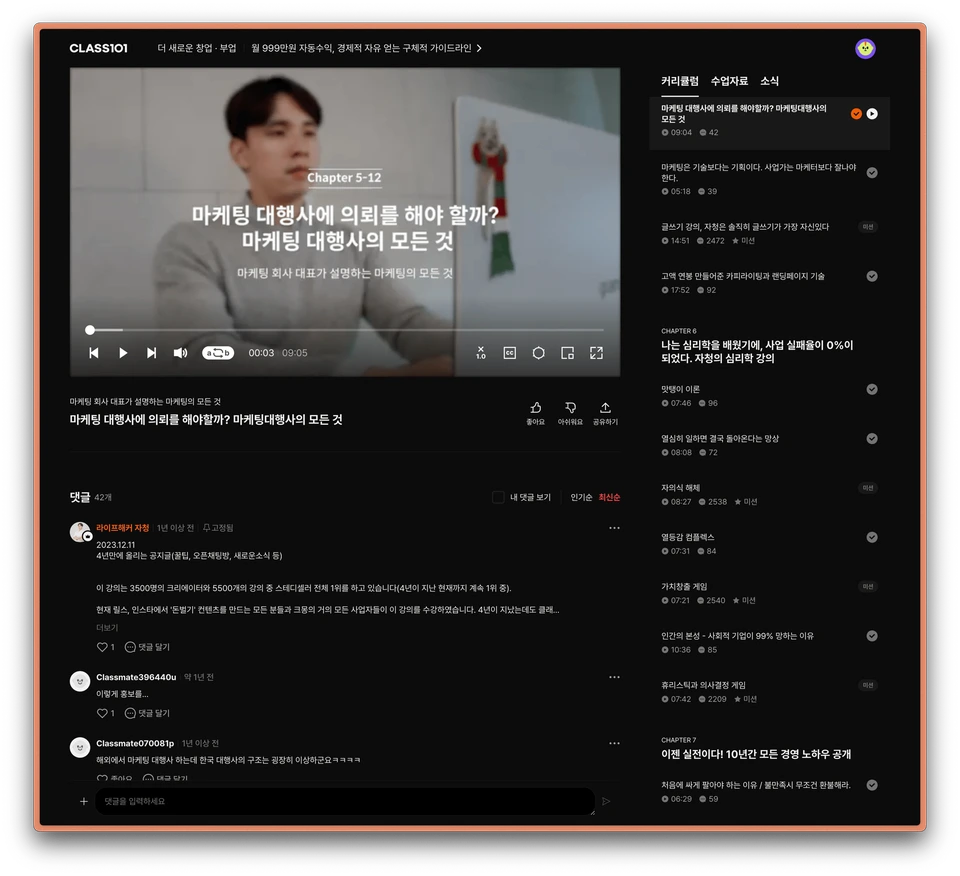
챕터의 순서
챕터의 순서만 쭉 따라가더라도 이해하는데 어려움이 없게 구성하는 것이 핵심입니다.
세부 강의 안에서도 구성적 고민이 필요하지만 전체 커리큘럼도 흐름을 생각할 필요가 있어요.
웰컴 → 현 상황 설명 및 동기부여 → 기초 → 중급 → 심화 → 활용 → 아웃트로
설명하지 않아도 이정도는 아시겠죠? 😋
예시
주언규 PD(신사임당)의 스마트스토어 클래스 중 하나를 예시로 드려볼게요.
챕터 번호 | 제목과 내용 |
|---|---|
웰컴 | 나는 월 천만 원 벌기로 마음 먹었다 / 가장 많이 묻는 7가지 등 |
1 | 스토어 준비하기: 개설 및 이름 정하기 / 사업자 등록하기 등 |
2 | 배송 환경 만들기: 위탁, 사입, 배송대행 / 택배사와 가격 조율 등 |
3 | 카테고리 선정: 좋아하는 일과 돈되는 일 구분하기 / 경쟁 강도의 측정 등 |
4 | 상품 고르기: 구할수 있는 상품과 돈되는 상품 구분 / 레드오션도 필요하다 등 |
5 | 상세페이지 작성: 가격 설정 / 상품 특징 찾기 / 썸네일의 조건 등 |
6 | 손님 끌어오기: 광고 세팅 기초 / 검색 최적화 등 |
… | 중간 생략 |
12 | 반복과 진화: 새로운 목표 세우기 / 포기하고 싶은 분들께.. 등 |
아웃트로 | 완강을 축하합니다. |
보시듯 확 눈이 가는 키워드 ‘천 만원’이나
클래스메이트가 가장 궁금해 하는 것들을 모아
웰컴 챕터에 배치함으로써 클래스 입문의 효과를 극대화 할 수 있습니다.
이후 챕터가 진행되면서 점점 쉬운 것부터 어려운 것까지를 다루고 있으며
챕터12에서는 여기까지 따라온 분들에게 그 이후의 방향을 안내하고 클래스를 마무리하고 있습니다.
모든 클래스가 이러한 구성으로 제작될 순 없지만,
어떤 것이 수강하기 자연스러운 흐름인지 고민해서 효과적인 순서를 만드는 것은 꼭 필요합니다.
이제, 중요한 웰컴챕터와 클래스101이 제공하는 수강 관련 기능에 대해 알아보겠습니다.
WELCOME 챕터란?
WELCOME 챕터 활용하기
클래스101 대부분의 클래스는 ‘WELCOME 챕터’로 시작합니다.
말 그대로 클래스메이트를 환영한다는 의미를 담아 클래스의 개괄적인 설명과
크리에이터 님이 특별한 이유를 많이 전달해주세요 😀
예시
유랑의 이모티콘 클래스의 웰컴챕터입니다.
세부 강의 번호 | 제목 |
|---|---|
1 | 안녕하세요, 이모티콘 작가 유랑입니다. |
2 | 제 강의를 추천드리는 이유! |
3 | 클래스 준비물을 알아볼까요? |
취미로 요리하는 남자 클래스의 웰컴챕터입니다.
세부 강의 번호 | 제목 |
|---|---|
1 | 야매여도 괜찮아~ 우리의 목적 |
2 | 반갑습니다, 취미로 60만 구독자와 함께하고 있는 요남입니다. |
3 | 준비물을 소개합니다. |
4 | [Mission] 실패한 요리를 통해 노하우를 쌓아요! |
위에서 보듯 크리에이터 본인의 소개와 이 클래스를 추천하는 이유에 대해 설명하며
준비물이 있다면 어떤 준비를 해야하는지, 첨부파일이 있다면 어떻게 활용해야 하는지를 설명하는 것도 좋습니다.
WELCOME에서 동기 부여 만드는 방법
다음에 대하여 질문을 해보고 특별한 이유를 만들어보세요
Q 클래스를 수강해야 하는 이유는 무엇인가요?
Q 클래스를 모두 완강하면 어떤 결과물을 얻을 수 있나요?
Q 누구나 노력하면 결과물을 얻을 수 있나요?
Q 커리큘럼을 구성할 때 어떤 점을 고민하면서 만들었나요?
Q 이 클래스는 어떤 분들을 위한 클래스인가요?
일부 세부강의는 무료로 볼 수 있게 설정할 수 있습니다.
효과적인 WELCOME 챕터를 만들고 이 챕터를 무료로 수강할 수 있게 설정해서 더 많은 클래스메이트가 수강을 시작할 수 있도록 해보세요.
수강 관련 기능: 미션
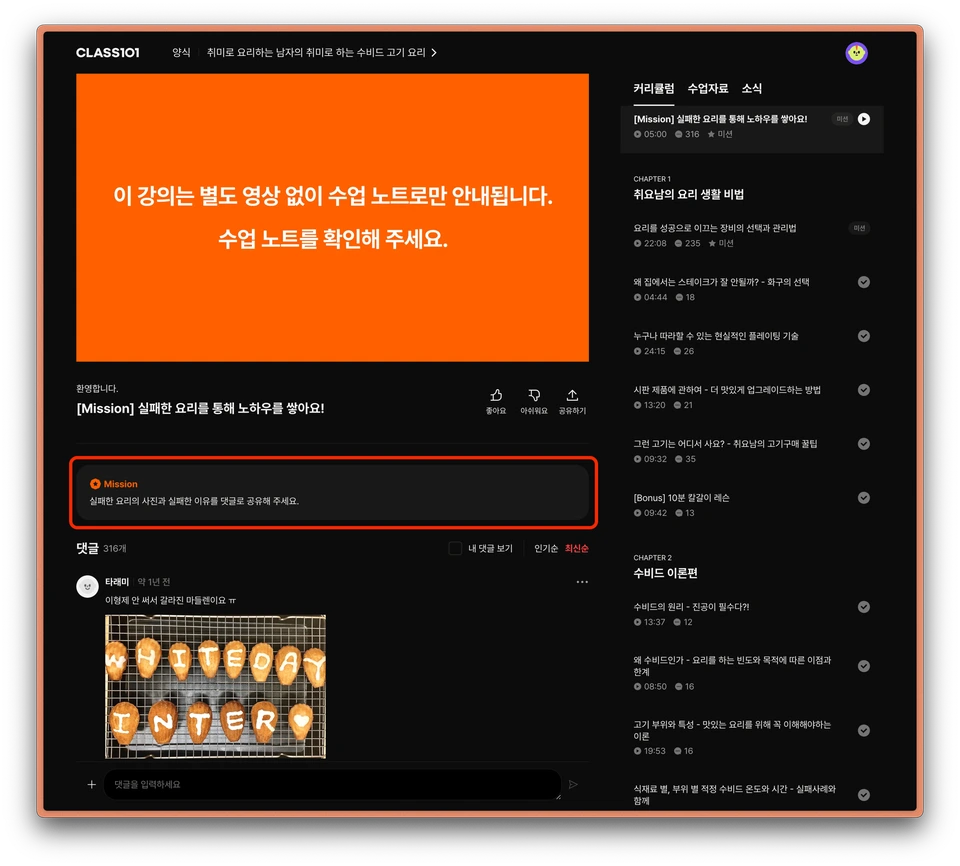
크리에이터는 클래스메이트에게 ‘미션’이라는 형태로 간단한 과제를 부여할 수 있습니다.
이 기능으로 클래스메이트의 참여를 유도해서 활발하고 재밌는 클래스를 만들어 보세요. 🥳
커리큘럼 구성 과정에서 적재적소에 미션을 배치해 클래스의 효과를 높이자고요 👊
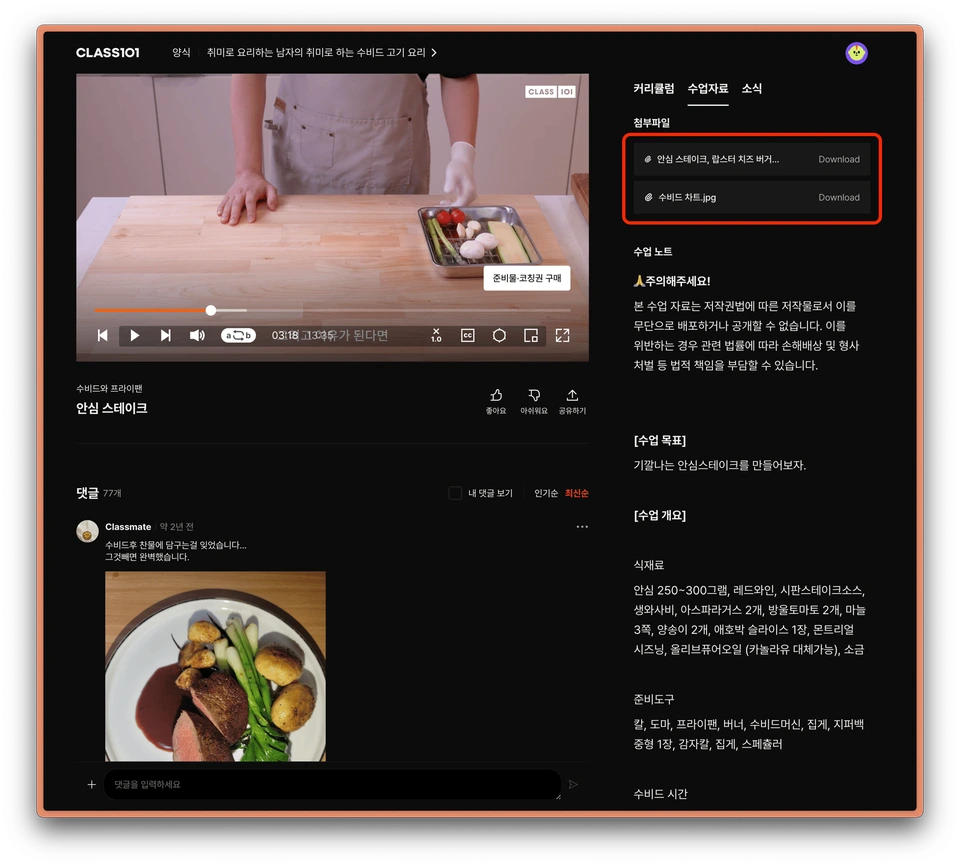
수강 관련 기능: 첨부 파일
클래스메이트는 [수업자료] 란에서 첨부 파일을 다운받을 수 있습니다.
첨부 파일이 있으면 보너스 선물을 받는 느낌이란 걸 알고 계셨나요?
다양한 첨부 파일을 클래스메이트에게 선물해 보세요. 🎁
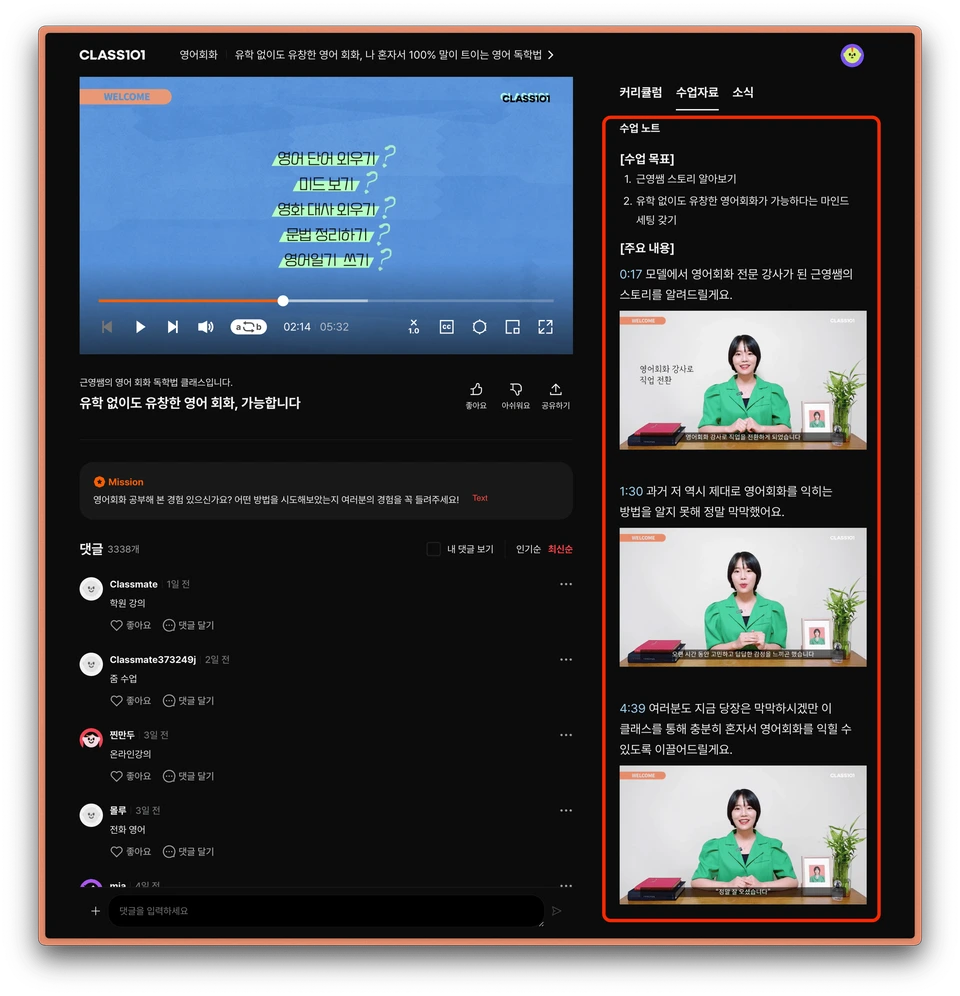
수강 관련 기능: 수업노트
[수업자료] 탭 하단에는 ‘수업 노트’가 자리합니다.
보통은 세부강의의 요약을 넣는 곳이지만, 크리에이터가 자유롭게 글과 그림을 넣을 수 있는 공간이예요.
클래스 영상 외에도 텍스트로 전달하고 싶은 내용이 있다면 이곳을 활용해 주세요.
복사 붙여넣기가 필요한 URL을 넣거나 하는 데 유용하겠죠? 🤔
종합해서…
크리에이터가 전달하고 싶은 주제를 강조하기 위해서
위에 나열한 기능을 다 이용해서 커리큘럼을 짜보세요.
클래스메이트의 참여가 꼭 필요할 땐 ‘미션’을 주고
클래스에 꼭 필요한 파일은 ‘첨부파일’로 제공하며
‘수업노트’로 영상으로 전달하기 어려운 텍스트를 전달하고
중요한 공지는 ‘소식’ 탭이나 ‘댓글 고정’ 기능을 이용할 수 있어요.
![[소식] 탭 예시](https://class101-creator-help-center.s3.ap-northeast-2.amazonaws.com/creator-help-center/helpcenter/1501/20260415_e3eb8d632bce_960w.webp)