What is a settlement wallet?
It's a feature that allows you to view all settlement funds from sales of all products you operate in one place, and request withdrawals directly at your desired time with your preferred settlement information.
Settlement/Revenue Withdrawal Terminology
Term | Description |
|---|---|
Revenue Withdrawal (Settlement Wallet Feature) | A virtual account-like space where all revenue generated from creator activities is collected and managed. |
Business Day | Refers to weekdays excluding weekends and holidays. (Based on KST) |
Scheduled to Convert to Withdrawable | Revenue has been generated, but this is the amount that cannot yet be withdrawn as the purchase confirmation or refund period has not passed. The expected date for conversion to withdrawable amount is displayed together. |
Withdrawable Amount | This is the actual available balance that creators can request to withdraw at any time according to the settlement policy for each product. |
Withdrawable Conversion Date | This is the reference date when amounts in 'Pending Withdrawable Conversion' status are actually changed to 'Withdrawable Amount'. (Based on KST) |
Minimum Withdrawal Amount | This is the minimum threshold amount that must be held in the wallet to make a withdrawal request.
|
Withdrawal Request | This is the step to request withdrawal of the desired amount from the withdrawable balance to your registered account (settlement information). |
Expected Payment Date | The expected date when the actual deposit will be completed to the creator's account after the withdrawal request is completed. (Based on KST) |
Expected Withdrawal Amount | The final amount that will actually appear in your bank account after deducting taxes (withholding tax based on business/individual status, etc.) and transfer fees from the withdrawal request amount. |
Settlement Information | Refers to the settlement information (business type and account information) registered directly by the creator.
|
Check Sales and Settlement History
💡 Creator Center > Revenue Withdrawal > Sales History
As soon as a 'payment' occurs for any product you operate, you can check it immediately in the sales history.
You can view sales records with desired conditions by product name and period, product type, and settlement status.
The settlement amount is calculated after applying [payment fees], [VAT and other costs], and [settlement ratio] according to service plans to the 'user's payment amount'.
Settlement Status
Represents the process of settlement confirmation, conversion to withdrawable status, and payment according to the settlement policy for each product by sales record.
Settlement Status Value | Description |
|---|---|
Scheduled for Withdrawable Conversion | Revenue has been generated, but withdrawal is not yet possible as the purchase confirmation or refund period has not passed. The scheduled date for withdrawable conversion is also displayed. |
Withdrawable | Settlement confirmation conditions (such as purchase confirmation) have been met, allowing creators to request withdrawal to their account at any time. |
Withdrawal Processing | The creator has completed the withdrawal request, and the system or relevant department is processing the transfer procedure. |
Withdrawal Complete | The withdrawal request has been processed and the deposit to the creator's account has been completed. |
Status values also change when users cancel payments or request refunds.
Settlement Status Value | Description |
|---|---|
Canceled | When a full refund occurs before conversion to withdrawable status and the order itself is canceled, the expected revenue amount is invalidated. |
Deduction | If a partial refund occurred before withdrawal eligibility conversion, or a full/partial refund occurred after withdrawal eligibility conversion, the balance has been processed as a minus by that amount. |
Deduction Complete | The minus (-) amount created by deduction has been offset by withdrawable amounts (+) from other sales, and the corresponding deduction has been completed through withdrawal processing and disappeared. |
When there is a scheduled deduction amount at the time of withdrawal request, the status value is also displayed separately.
Settlement Status Value | Description |
|---|---|
Deduction | At the time of withdrawal request, there is a scheduled deduction amount, and that amount is scheduled to be adjusted together during the withdrawal processing. When withdrawal is completed, the final amount with the deduction subtracted will be deposited. |
Request Withdrawal
'Settlement Information' must be registered to make a withdrawal request.
When a withdrawable amount becomes available, you can make a 'withdrawal request'. You can select your desired settlement information to receive payment.
Tax calculations for the withdrawable amount will be processed according to the business type of the selected settlement information.
If there is no registered settlement information

Click the [Enter Settlement Information] button.
Register 'settlement information' and proceed with the earnings withdrawal request again.
If there is registered settlement information

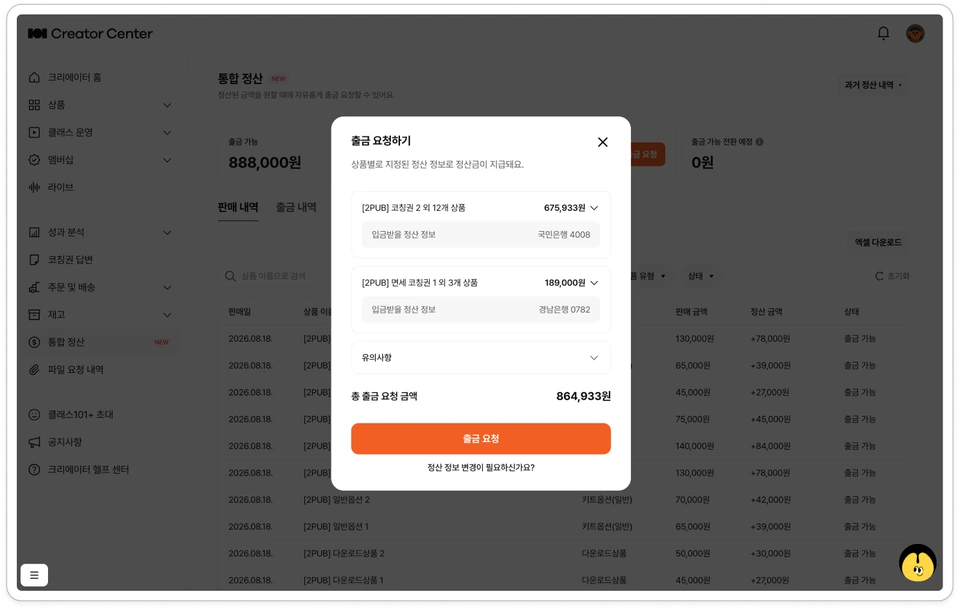
Click [Request Withdrawal].
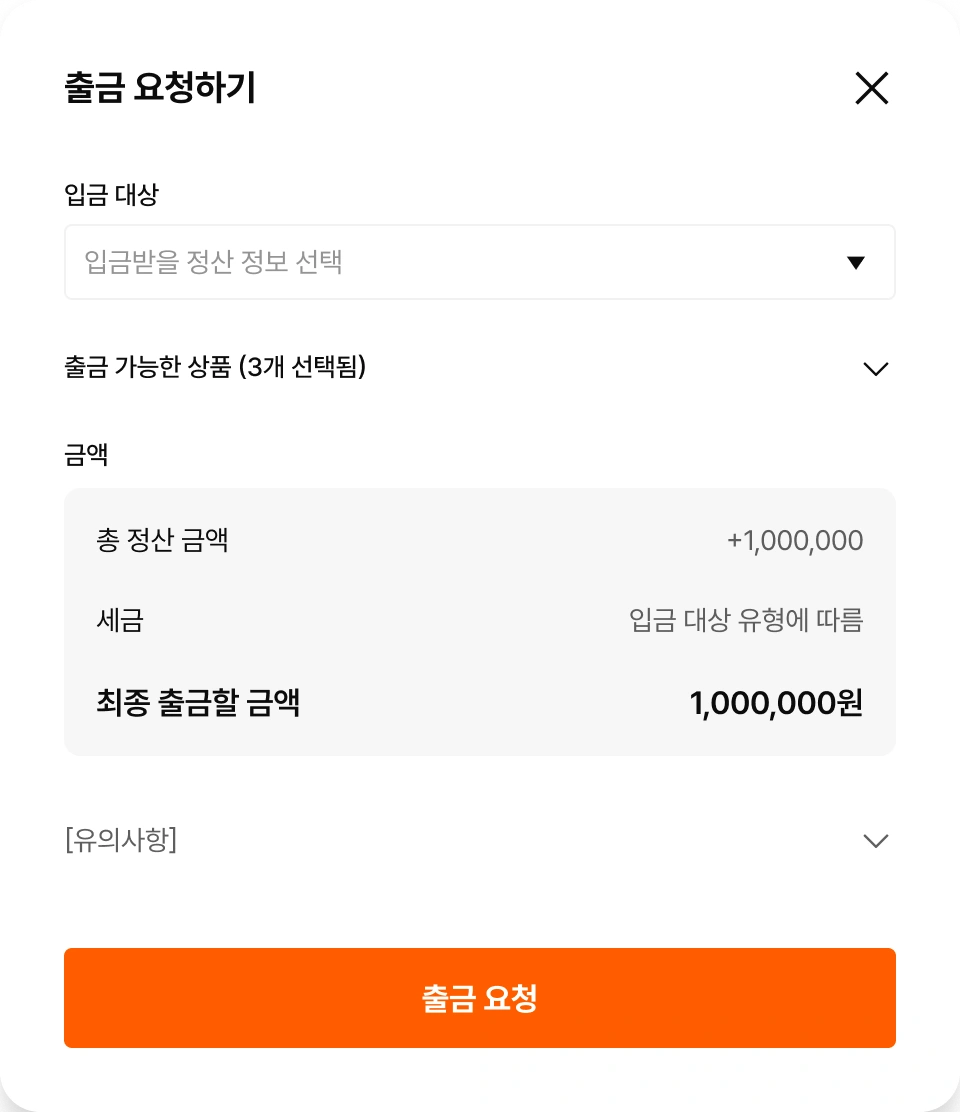
In the <Request Withdrawal> modal, select 'deposit recipient' and 'withdrawable products'.
Check the taxes (VAT and withholding tax) calculated according to the selected 'deposit recipient (settlement information)'.
Check the 'final withdrawal amount' and click [Request Withdrawal].
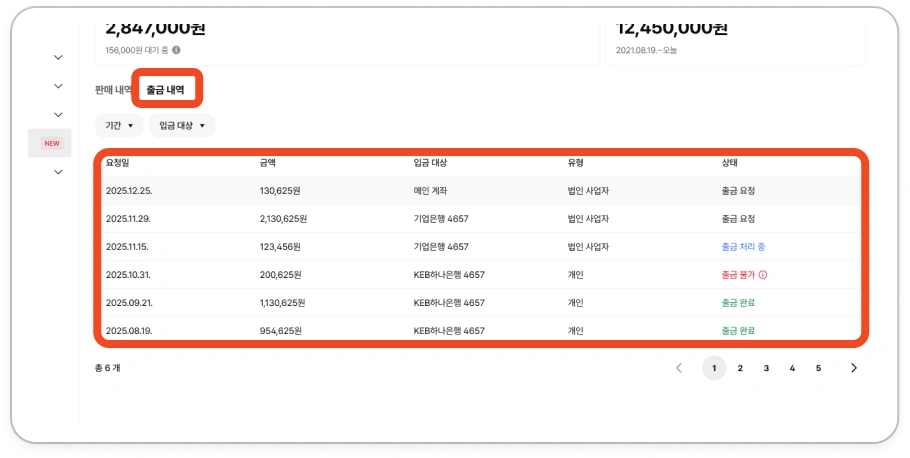
Check 'withdrawal requests' submitted in Revenue Withdrawal > Withdrawal History.

Check Withdrawal History
💡 Creator Center > Revenue Withdrawal > Withdrawal History
You can check the withdrawal history submitted through 'Request Withdrawal'.

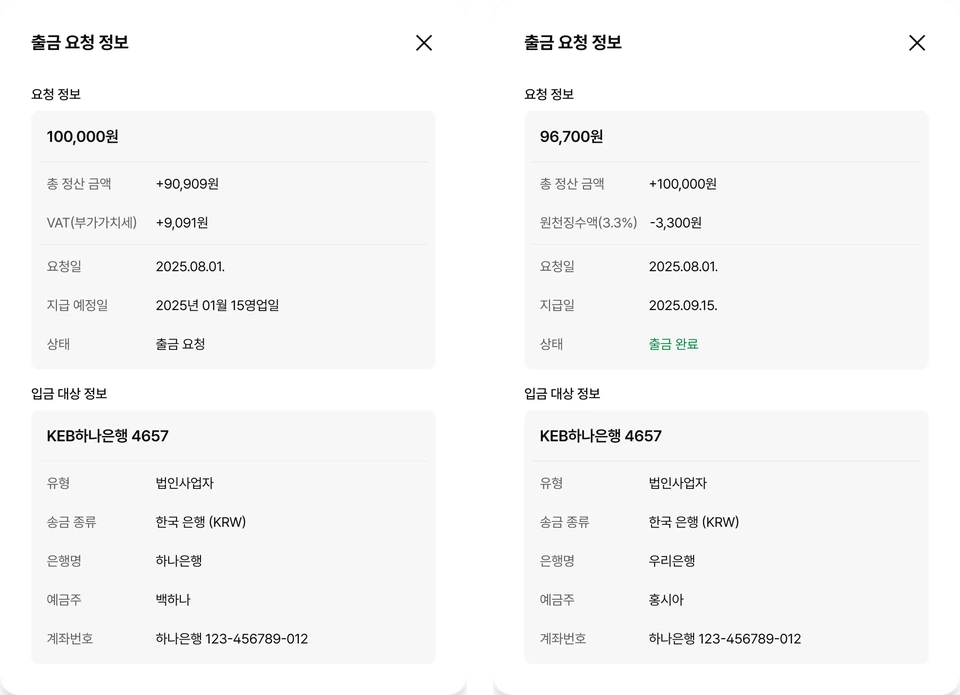
Click on each request in the withdrawal history to view detailed information.

Withdrawal Status
Withdrawal amounts are paid according to the payment schedule below for each withdrawal request.
15th business day of the following month (KST) : Withdrawal requests made between the 1st and last day of the current month
Payments are made to the account registered in the settlement information selected when applying for payment.
Withdrawal Status Values | Description |
|---|---|
Withdrawal Request | The withdrawal request has been completed. Withdrawal requests submitted by the end of each month will be processed sequentially starting from the first business day of the following month. |
Withdrawal Processing | The withdrawal request you submitted is currently being processed by the relevant department for transfer. If reverse tax invoice issuance is required, approval for reverse tax invoice issuance through Popbill may be requested. |
Withdrawal Complete | The withdrawal request has been completed and the deposit to the creator's account has been finalized. |
Withdrawal Unavailable | The withdrawal request has failed due to expired reverse tax invoice approval period or invalid settlement information (business/account information). *When converted to withdrawal unavailable, the requested amount will be returned to the 'withdrawable' amount. |