What is Multiple Withdrawal?
This feature allows you to submit multiple withdrawal requests at once, even for products linked to different settlement information.
Since settlement information is pre-assigned to each product, you don't need to select each recipient one by one or submit multiple separate requests. This is especially useful if you're running classes, kits, memberships, and more together.
How do I submit a request?
💡 Creator Center > Integrated Settlement > Withdrawal Request
Click [Withdrawal Request].
Review the settlement details available for withdrawal based on the products linked to each set of settlement information.
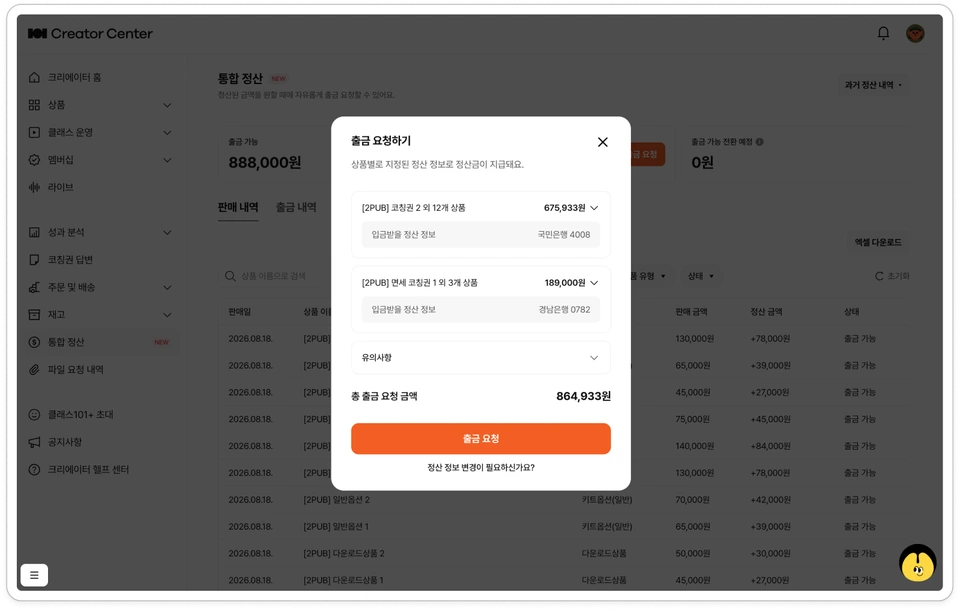
Check the taxes (VAT and withholding tax) calculated for each settlement profile.
Confirm the final withdrawal amount and click [Withdrawal Request].
Check the generated withdrawal request under Integrated Settlement > Withdrawal History.
Are withdrawal requests combined into one?
No. Even if you submit them all at once, withdrawal requests are created separately for each payment information entry.
Category | Processing Method |
|---|---|
Withdrawal Request | Created separately for each payment information entry |
Actual Payment | Deposited separately into the account registered under each payment information entry |
Tax invoice and settlement documentation processing | Issued separately for each payment information entry (or processed as settlement documentation) |
Tax Calculation | Applied separately based on the business type in the settlement information |
If a reverse tax invoice is required, you must approve each settlement information entry separately. If even one approval deadline is missed, only that withdrawal request will be automatically canceled, and the amount will be returned to 'Withdrawable' status.
How is the minimum withdrawal amount applied?
👉 Please check the minimum withdrawal amount criteria below: What is the minimum withdrawal amount?
Please note!
The payment schedule remains the same as before. Withdrawal requests made in the current month are collected on the first business day of the following month and paid out on the 15th business day of the following month (based on KST).
Products without designated settlement information are excluded from withdrawal requests. Please register the settlement information for those products first.