Adobe Creative Cloud 1년 이용권과 클래스101 플러스 연간 구독권을 묶어 판매하는 제휴 패키지입니다.
패키지 구성
구성품 | 내용 |
|---|---|
Adobe Creative Cloud 1년 이용권 | 학생·교사용 STE 플랜 코드로 발급(연령 불문 이용 가능). 한 어도비 계정당 1회만 등록 가능 |
클래스101 플러스 연간 구독권 (1년) | 구독으로 수강 가능한 클래스 전체 이용(개별 구매 클래스는 별도 구매). 코드 형식으로 발급 |
Adobe 이용권만 따로 구매할 수는 없습니다(차액 결제로 기존 구독에 어도비만 추가하는 것도 불가).
드로잉 외에도 3D 렌더링, 모션그래픽 등 여러 분야의 클래스 수강권을 포함하는 올인원 패키지는 어도비 올인원 패키지에서 구매합니다.
코드 발급 일정 및 확인 경로
발급 기간: 구매 후 3영업일 이내에 발급합니다.
확인 경로: 클래스101 홈페이지 → 우측 상단 프로필 아이콘 → 주문 및 배송 → 다운로드
클래스101 플러스 연간 구독권 등록
구독 상태 | 등록 방식 | 이용 기간 |
|---|---|---|
미구독 상태 | 구매 즉시 자동 등록 (별도로 등록하지 않아도 됩니다) | 등록일로부터 1년 |
구독 중 | 코드가 발급되며 자동 적용되지 않음 — 기존 구독 만료 후 직접 등록 | 등록 시점으로부터 1년 |
미구독 상태에서는 이용을 시작할 날짜에 구매하는 것을 권장하며, 이용 기간 조정은 어렵습니다.
구독 중인 경우: 기존 구독이 종료되는 시점에 마이페이지에서 코드를 내려받아 별도로 등록합니다. 기존 구독이 갱신 결제되지 않도록 해지 예약을 해 주세요.
즉시 전환을 원하는 경우: 고객센터에 문의해 기존 구독을 부분 환불받은 뒤 이용권을 등록할 수 있습니다.
구독권은 중복 적용이 불가능하며 자동 연장되지 않습니다. 구독 이용권 코드는 등록한 뒤에는 환불되지 않습니다.
Adobe Creative Cloud 이용권 등록 절차
클래스101 홈페이지 → 우측 상단 프로필 → 주문 및 배송 → 다운로드로 이용권 코드 확인
Adobe 코드 등록 페이지(https://redeem.adobe.com/educard) 접속
기존 Adobe 계정으로 로그인하거나 신규 계정 생성
학업 상태 확인 입력 — 직책: 교직원 선택 / 이름 입력 / 학교명: 클래스101 또는 class101 입력 / 전공 분야: 임의 선택
상환 코드 입력란에 코드 입력 후 상환 코드 버튼 클릭
결제 방법 추가 또는 나중에 알림 중 선택
시작하기 버튼 클릭 → 등록 완료
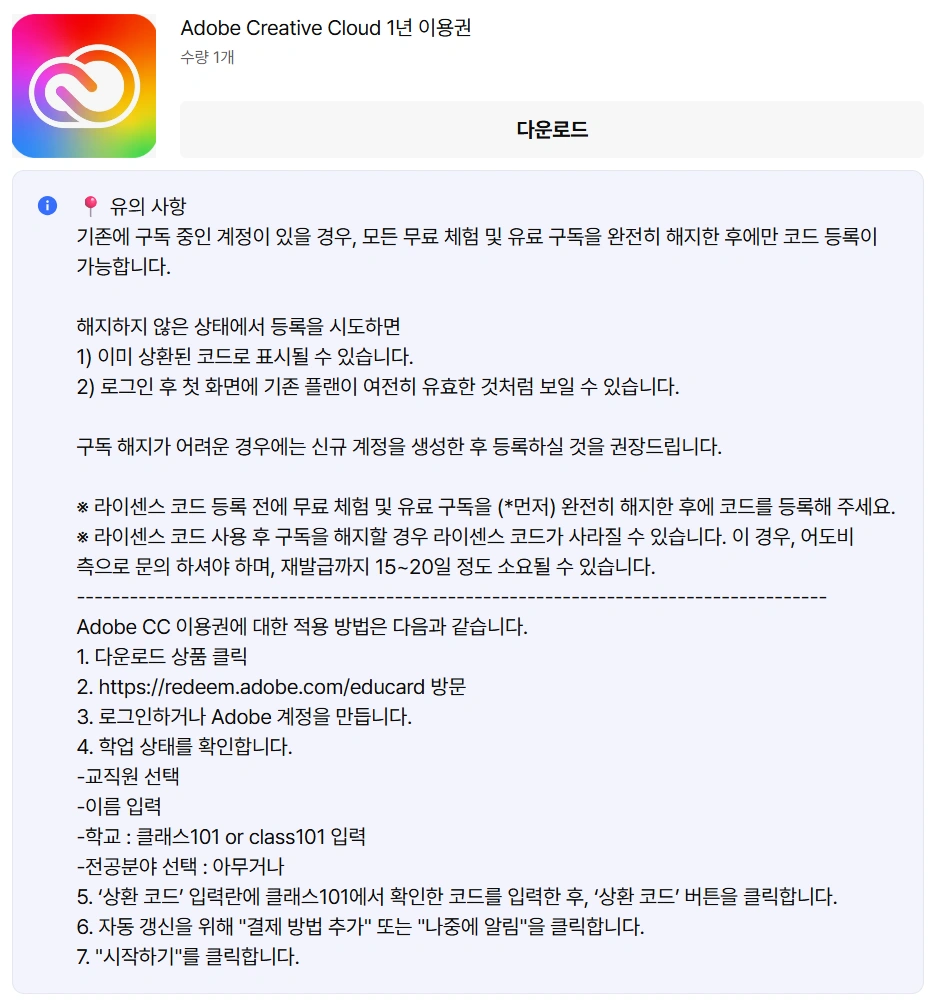
코드 등록 전 유의사항 (필독 안내)
코드를 등록하기 전에 아래 유의사항을 꼭 확인해 주세요.
어도비 라이선스 코드 확인·다운로드 시 실제 등록하지 않았더라도 환불이 불가합니다.
사용 중인 Adobe 아이디에 기존 플랜(유료/무료 체험 포함)이 있는 경우, 반드시 기존 플랜을 먼저 취소한 후 상환하거나 신규 아이디를 생성해서 상환해야 합니다.
취소 없이 바로 상환한 경우 로그인 첫 화면에서 기존 플랜이 유효한 것처럼 보일 수 있습니다. 계정 아이콘 → 계정 관리 페이지에서 새로 등록한 1년 플랜이 보이지 않으면 기존 플랜을 취소하지 말고 어도비 고객센터로 문의해 주세요.
클래스101에서 제공하는 어도비 플랜은 STE 플랜으로, 어도비 한 계정당 한 번만 사용할 수 있는 코드입니다.
코드를 등록하면 즉시 1년간 이용할 수 있습니다.
코드 등록 가능 기한: 클래스101-Adobe 결합 상품 판매 기간 동안 등록할 수 있고, 운영 정책에 따라 사전 고지 없이 판매가 종료될 수 있습니다.
등록 마감일 이후에는 등록과 이용이 모두 불가능하므로 기한 안에 등록해야 합니다.
환불
어도비 이용권은 디지털 키트(다운로드 상품)로 취급됩니다. 구매 후 7일 이내이고 코드를 다운로드하지 않은 경우에만 환불 가능하며, 코드 다운로드·등록 시 환불이 불가합니다(다운로드 시 "환불 불가" 팝업 사전 고지).
Adobe Creative Cloud 포함 앱 목록
분류 | 제공 앱 |
|---|---|
디자인/일러스트 | Illustrator, Photoshop, InDesign, XD, Fresco, Photoshop Express |
사진/영상 편집 | Premiere Pro, After Effects, Lightroom, Lightroom Classic, Media Encoder, Audition, Animate |
문서/웹/기타 | Acrobat Pro, Dreamweaver, Bridge, Dimension, Adobe Express, Adobe Firefly, Character Animator |
각 앱은 PC에서 설치해 사용합니다. 일부 앱(Photoshop, Lightroom 등)은 웹 버전도 지원하나, 태블릿·모바일에서는 일부 기능이 제한될 수 있습니다.
문의
Adobe 사용 관련 문의(앱 오류, 기존 계정의 STE 플랜 이용 이력 확인 등)는 Adobe 고객센터로 해 주세요.
주의 사항
Adobe 이용권 코드를 재판매하는 행위는 엄격히 금지되어 있고 처벌 대상입니다.
구매한 어도비 코드(STE 플랜)는 한 어도비 계정에 단 한 번만 등록할 수 있습니다. 어도비 패키지를 추가로 구매한 경우, 새 어도비 계정을 만들어 등록해야 합니다. 기존 계정에 재등록을 시도하면 오류가 발생합니다.
코드를 등록하기 전에 위 「코드 등록 전 유의사항」 4개 항목을 먼저 확인해 주세요.