클래스101 플러스 연간 구독 환불 신청 방법
클래스101 플러스 구독 상품은 클래스101 웹사이트 또는 앱을 통해 직접 환불 신청할 수 있습니다. 환불 기준에 따라 전액 환불 또는 부분 환불이 가능하며, 결제 방식에 따라 절차가 다를 수 있습니다.
환불 신청 경로
다음 경로를 따라 신청해 주세요.
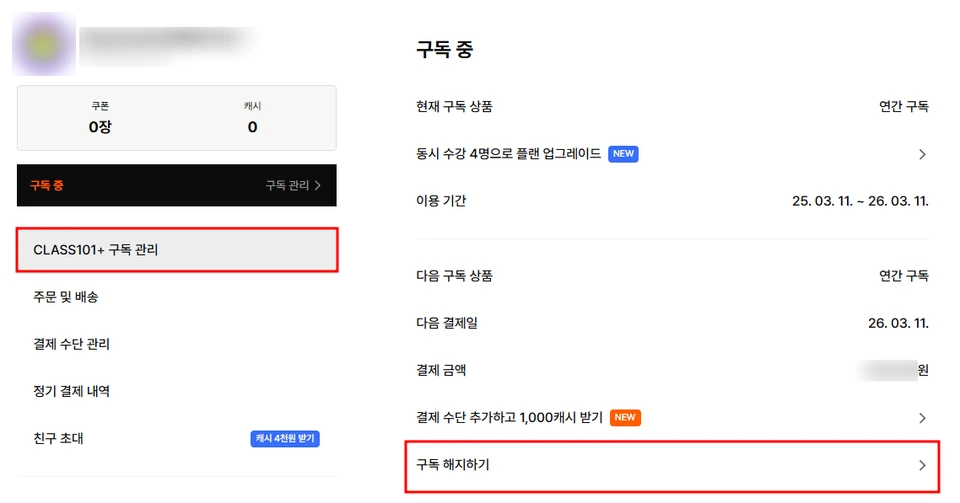
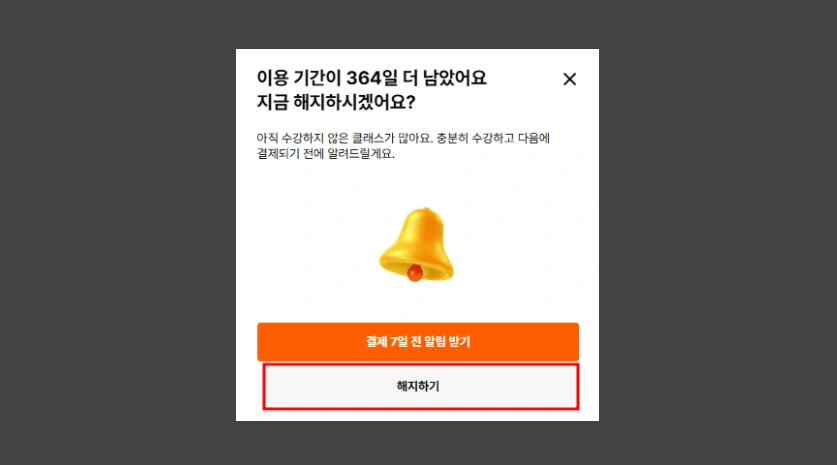
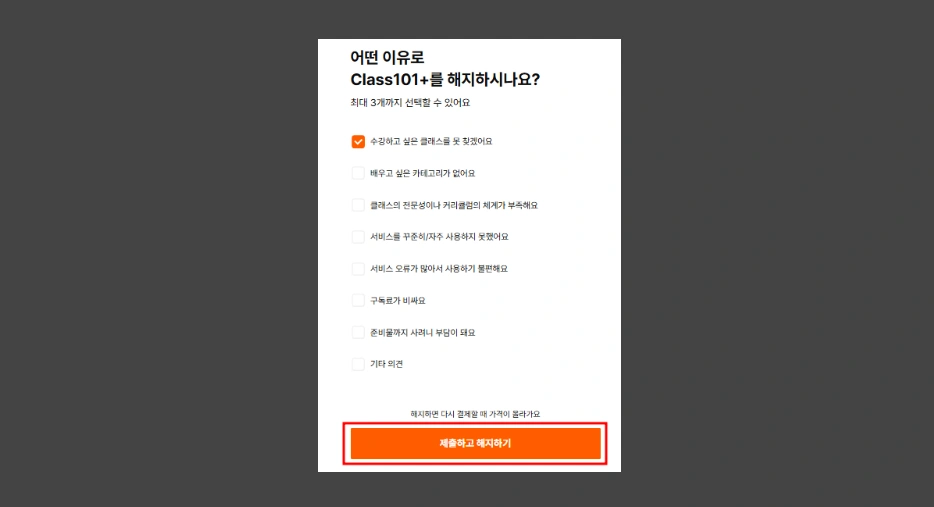
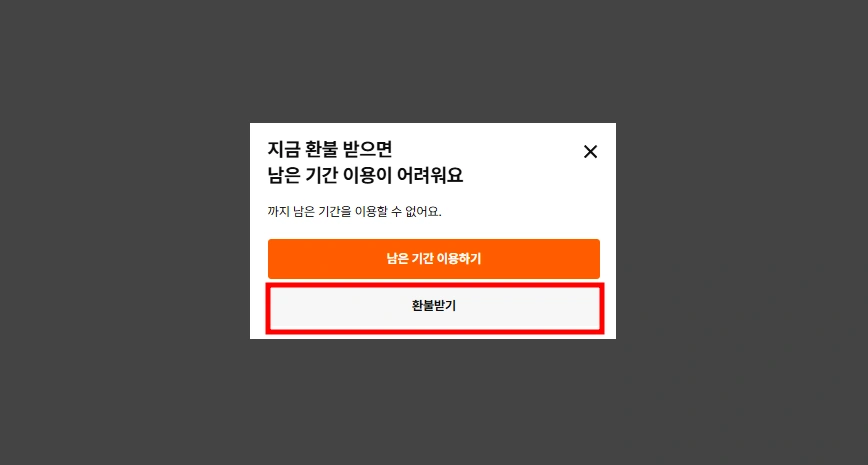
[로그인 > 마이페이지(우측 상단 프로필 클릭) > 클래스101+구독관리 > 구독 해지하기 > 해지하기 > 해지 이유 선택 > 환불받기]
환불 기준 안내
구분 | 상세 기준 |
|---|---|
전액 환불 | 결제일로부터 7일 이내에 콘텐츠 또는 서비스를 이용하지 않은 경우에만 가능합니다. |
부분 환불 | 중도 환불 시 환불 신청일을 포함하는 이용 개월 수만큼 차감한 뒤 남은 금액의 90%가 환불됩니다. |
환불 산정식: [ (실 결제 금액 - 이용 개월 수 * 월금액) * 0.9 = 환불 예상 금액 ]
월금액(연간 구독 서비스 정가금액)은 정가를 기준으로 12개월을 나눈 금액입니다.
상세 가이드 및 주의 사항
환불에 관한 자세한 내용은 이용약관 바로가기를 통해 확인 부탁드립니다.
중도 환불을 신청하더라도, 신청일이 포함된 해당 월의 구독 기간 종료일까지 콘텐츠를 이용할 수 있습니다.
예시) 2024년 9월 5일 오후 9시 15분에 연간 구독을 결제한 사용자가 2024년 11월 12일에 환불을 요청한 경우, 2024년 12월 5일 오후 9시까지 수강 가능합니다.
구매처별 환불 방법
구매처 | 환불 요청 방법 |
|---|---|
외부 온라인/오프라인 상점(오픈몰, 선물 스토어 등) 또는 애플 앱스토어 | 해당 구입처에 직접 환불을 요청해 주세요. |
구글 플레이 스토어 | 클래스101 고객센터를 통해 환불 요청을 진행해 주세요. |
카드사 환불 처리에는 영업일 기준 2~5일이 소요될 수 있습니다.
외부 결제 채널을 통한 결제는 클래스101에서 직접 처리할 수 없으므로 반드시 구입처의 환불 정책을 확인해 주세요.
환불 정책에 대한 내용은 환불정책 바로가기에서 확인해주세요.
카드가 만료된 경우, 무통장 입금으로는 환불이 불가능합니다.
그룹 플랜 환불 및 해지
그룹 플랜의 결제, 해지, 환불, 결제수단 관리 등은 ‘대표’ 계정에서만 가능합니다. ‘구성원’ 계정에서는 그룹 조회 및 나가기 기능만 제공되며, 결제 관련 기능은 지원되지 않습니다.
그룹 플랜 해지 기준
그룹 플랜의 청약철회 및 해지는 클래스101 이용약관 제2.5조(청약철회 및 해지)에 따릅니다. 해당 조항에서의 ‘서비스 이용’은 대표 및 구성원 계정 전체의 서비스 이용 내역을 포함합니다.
청약철회 또는 해지를 위해서는 ‘대표 계정’을 제외한 모든 구성원이 그룹에서 삭제되어야 합니다. 구성원 삭제는 '내보내기' 또는 구성원의 '나가기' 기능을 통해 진행할 수 있습니다.
대표 계정에서만 환불 및 해지가 가능하며, 구성원 계정에서는 해당 작업을 할 수 없습니다.
그룹 구성원이 남아 있는 상태에서는 청약철회 및 해지가 불가능하오니, 반드시 구성원을 먼저 삭제해주시기 바랍니다.
할부 결제 시 환불 안내
환불이 진행되더라도 카드사에서는 할부 설정에 따라 기존 12개월 동안의 분할 금액이 계속 청구될 수 있습니다. 이는 환불이 되지 않아서가 아닌, 처음 승인된 12개월 할부 결제가 환불 시 일부만 환불 처리되기 때문입니다. 카드사 정책에 따라 환불 금액 반영 방식이 다를 수 있으므로, 자세한 내용은 카드사로 직접 문의해 주세요.
자주 묻는 질문
아닙니다. 환불을 하셔도 신청일이 포함된 해당 월의 구독 종료일까지는 콘텐츠를 계속 이용하실 수 있습니다.
클래스101 플러스는 6,400개 이상의 클래스를 1년 동안 무제한으로 수강할 수 있는 서비스입니다. 다만 일부 클래스의 경우, 크리에이터와의 계약 조건에 따라 구독 제공 대상에서 제외될 수 있습니다. 수강 가능 여부에 대해서 확인하는 방법은 아래 링크에서 자세히 확인해 주세요.