AIThis document was translated by AI and may contain mistakes.

Find Account (ID)

Find Account by Phone Number

If you don't remember which account you logged in with, you can check your existing accounts through your phone number. Please prevent creating duplicate accounts and log in with your original account.

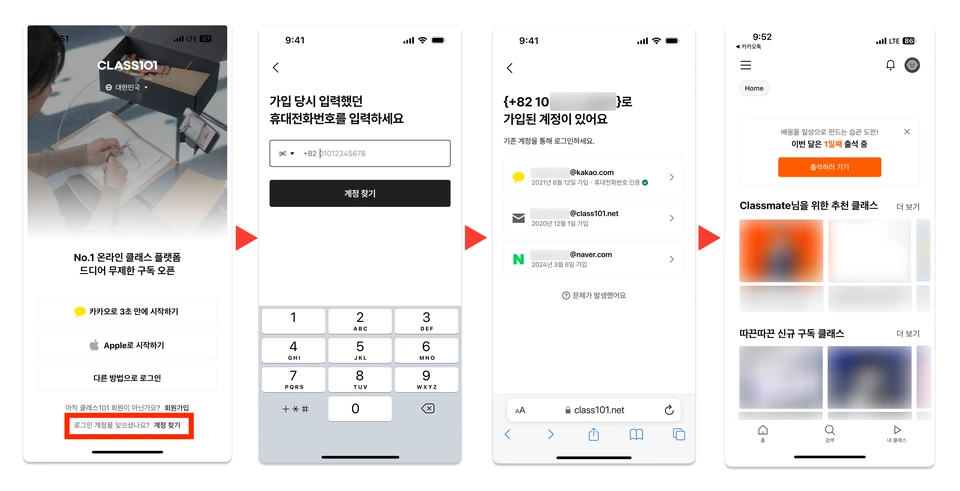
If there is a registered account

You can check the list of accounts you've logged in with through the path below and select the desired account to log in.

[Find Account > Enter Phone Number > Select Registered Account > Login Complete]

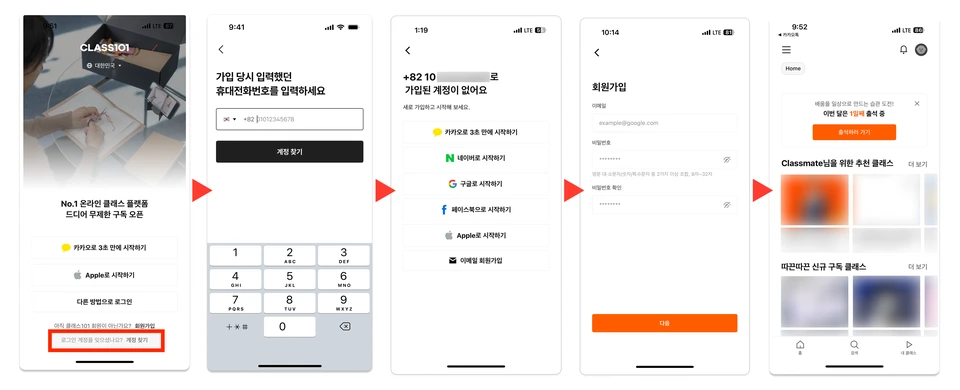
If there is no registered account

If there is no account registered with the entered number, you will be directed to the new member registration screen.

[Find Account > Enter Phone Number > No Registered Account > Registration Screen > Registration Complete]

Notes

Contact Customer Support

If you cannot find it using the above method, please contact CLASS101 online customer support: http://101.gg/chat.

Was this document helpful?

홍진우Edited 2026-05-20 by 홍진우