키트(준비물) 구매 안내
클래스101에서는 강의에 필요한 준비물(키트)을 클래스 화면 내 준비물・구매 버튼을 통해 별도로 구매하실 수 있습니다.
상세 구매 방법
원하는 클래스 클릭
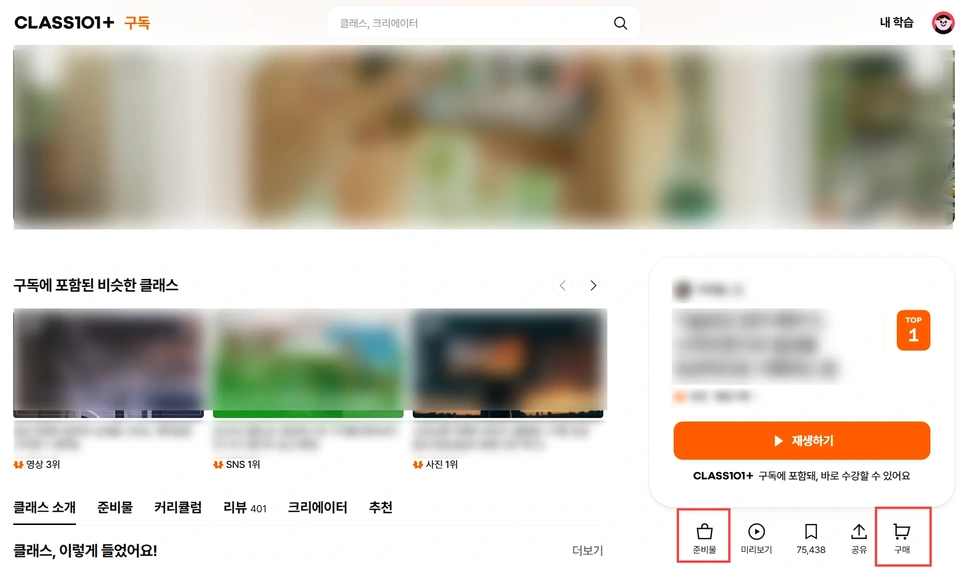
클래스 소개 카드 하단에 있는 준비물・구매 버튼 클릭
구매 시 유의 사항
준비물・코칭권 구매 버튼은 준비물이 제공되는 클래스에만 노출됩니다.
준비물이 없는 클래스의 경우 해당 버튼을 클릭해도 구매 페이지가 표시되지 않습니다.
클래스101에서는 강의에 필요한 준비물(키트)을 클래스 화면 내 준비물・구매 버튼을 통해 별도로 구매하실 수 있습니다.
원하는 클래스 클릭
클래스 소개 카드 하단에 있는 준비물・구매 버튼 클릭
준비물・코칭권 구매 버튼은 준비물이 제공되는 클래스에만 노출됩니다.
준비물이 없는 클래스의 경우 해당 버튼을 클릭해도 구매 페이지가 표시되지 않습니다.
이 문서가 도움이 되었나요?